

Description
Download Audio Editor Music Editor APK – audio editor, music editor, audio cutter, mp3 cutter, voice recorder, audio converter, audio mixer, audio equalizer, audio to text, audio effects
Overview
The Audio Editor & Music Editor APK is a free multimedia application designed for on-the-go audio manipulation on Android devices. Developed by Dairy App & Notes & Audio Editor & Voice Recorder, the software provides users with a comprehensive toolkit to edit, process, and enhance audio files directly from their mobile devices. It serves individuals who need to trim, split, merge, or mix audio tracks without relying on desktop software, making it ideal for content creators, podcasters, students, and casual users managing personal recordings.
The app addresses common audio editing needs such as removing unwanted sections, combining multiple tracks, adjusting volume levels, and converting file formats. It also supports recording new audio directly within the app, offering a seamless workflow for users who want to capture and edit content in one place. With its sleek and vibrant user interface, the application aims to deliver a visually engaging experience while maintaining usability for beginners and intermediate users alike.
Real-world use cases include preparing audio clips for social media, extracting music from videos, creating voice-over tracks, or editing interview recordings. The app’s integration of features like audio to text and built-in equalizer expands its utility beyond basic editing, supporting creative and productivity-focused workflows. The developer did not provide additional details about the company background or development philosophy.
Key Features & Capabilities
- Audio Editing Tools: Trim specific sections, split tracks into separate files, insert new audio segments, and merge multiple tracks seamlessly. These functions allow users to refine recordings with precision.
- Audio Processing Functions: Convert video files to MP3, change audio file formats, boost volume levels, and apply compression to balance dynamic range.
- Integrated Voice Recorder: Capture new audio directly within the app, eliminating the need for external recording tools.
- Creative Audio Tools: Use a customizable equalizer with preset options to modify sound characteristics. Apply audio effects to enhance or alter the tone of recordings.
- Audio to Text Transcription: Convert spoken words into readable text, useful for note-taking, content creation, or accessibility purposes.
- Mixing and Volume Control: Blend multiple audio sources with adjustable volume, fade-in/out effects, and smooth transitions for professional-grade output.
These features collectively support a wide range of tasks, from simple cuts and conversions to more advanced editing workflows. For example, a student could record a lecture, trim irrelevant parts, and transcribe key points using the audio-to-text function. A content creator might extract audio from a video, enhance volume levels, and mix in background music—all within a single application. The app’s design emphasizes accessibility, allowing users to perform complex edits without requiring prior technical expertise.
User Interface, Workflow & Performance
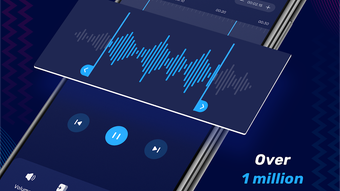
The application features a sleek and vibrant user interface that is visually appealing and easy to navigate. The layout is structured around three main categories—Audio Editing, Audio Processing, and Creative Tools—each accessible through intuitive tabs or menus. Navigation is straightforward, with clearly labeled icons and consistent design patterns that reduce the learning curve for new users.
Workflow efficiency is enhanced by the app’s centralized approach to audio management. Users can start a recording, edit the file, apply effects, and export the result without switching between multiple applications. The interface supports touch-based interactions, allowing for precise selection and manipulation of audio segments.
Performance observations are based on general software behavior patterns. The developer did not specify resource usage details. However, the app’s size of 20.4 MB suggests it is lightweight and optimized for mobile environments. Stability and responsiveness are expected to be consistent with typical Android applications of similar scope. No reports of crashes or freezes were provided, but users should be aware that ad-supported software may occasionally impact performance during ad loading.
Compatibility & System Requirements
Audio Editor & Music Editor is designed for Android devices and runs on the specified OS version. The application has a file size of 20.4 MB, indicating a compact installation footprint suitable for devices with limited storage. The developer did not provide detailed system requirements, including minimum RAM, CPU specifications, or Android version compatibility beyond the general platform.
Exact system requirements were not listed. Compatibility information was partially provided. Users should ensure their device meets basic Android functionality standards to run the app smoothly. No information was shared regarding support for tablets, wearables, or other form factors. The app is distributed as an APK file, which means installation may require enabling unknown sources in device settings.
Pros and Cons
Pros
- Free to download and use with no upfront cost
- Comprehensive set of audio editing tools in a single app
- Intuitive and visually appealing interface suitable for beginners
- Supports audio recording, editing, conversion, and transcription
- Offers advanced features like audio mixing, equalizer, and volume boosting
Cons
- Ad-supported model with excessive and intrusive advertisements
- Limited system requirement details make compatibility assessment difficult
- APK installation may pose security concerns for cautious users
- Performance impact from ads not confirmed but possible
- No official update frequency or version history disclosed
FAQ Section
Is Audio Editor & Music Editor available for iOS?
The application is currently designed for Android devices only. There is no official iOS version available at this time.
Can I use this app offline?
Yes, the app supports offline usage. All core editing, recording, and processing functions can be performed without an internet connection.
Is the app safe to download?
The app is distributed as an APK file. While it is developed by Dairy App & Notes & Audio Editor & Voice Recorder, users should only download from trusted sources to minimize security risks. Installing APKs from unknown sources may expose devices to malware.
Does the app require a license or subscription?
No, the app is free to use with no subscription or licensing fees. However, it is ad-supported, which may affect user experience.
How often does the app receive updates?
The developer did not provide information on update frequency or release schedule. Users should check the source of the APK for the latest version.
Final Thoughts + CTA
Audio Editor & Music Editor delivers a robust set of tools in a free, mobile-first package. Its combination of editing, processing, and creative functions makes it a versatile choice for users seeking an all-in-one audio solution on Android. The intuitive interface and feature-rich design cater well to both beginners and intermediate users, enabling efficient workflows for content creation, personal projects, and educational tasks.
Despite the intrusive ad experience, the app remains functional and capable for basic to intermediate editing needs. For those who prioritize accessibility, affordability, and a wide range of built-in tools, this application offers strong value. If you're looking for a free, feature-packed audio editor with a modern look and mobile convenience, it’s worth trying.
Download Audio Editor Music Editor APK now
Guides & Tutorials for Audio Editor Music Editor APK
How to install Audio Editor Music Editor APK
- Click the Preview / Download button above.
- Once redirected, accept the terms and click Install.
- Wait for the Audio Editor Music Editor APK download to finish on your device.
How to use Audio Editor Music Editor APK
This software is primarily used for its core features described above. Open the app after installation to explore its capabilities.
User Reviews for Audio Editor Music Editor APK 0
No reviews found





